Thursday, November 13, 2014

Android Wear has gotten an update or two so far since its official unveiling
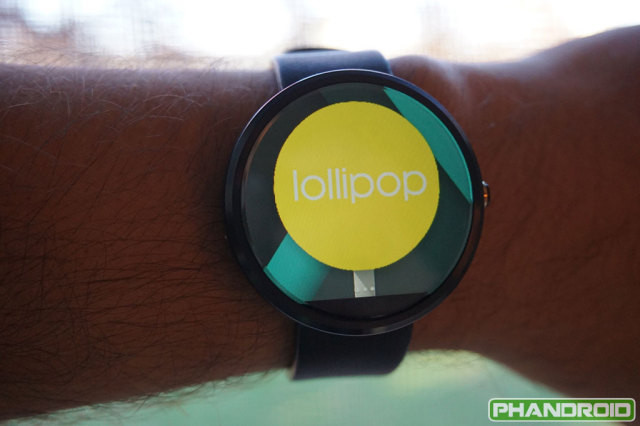
 a few months back, but those only brought with them minor new features. That said, it looks like the Lollipop update for Google’s wearable platform will come with many new things, and they’ve all been detailed in a comprehensive leak.


Now that Android 5.0 Lollipop for phones and tablets is ready to start appearing in over-the-air updates near you, we assume Android Wear will be the next focus for Google – namely, getting it updated to Lollipop.
And when that does happen, you’ll see a new Watch Battery section in the Android Wear app for mobile devices. This will act just like the Battery part of the Android Settings menu, showing you graphs and which apps ate the most of your battery capacity. Again similarly to what you can see in Android for phones and tablets, you’ll also get a Storage section, which will detail how much of your watch’s internal memory is occupied and how much is free, as well as which apps take up the most space.
Next up, watch faces will become even more customizable. You’ll change them from the Android Wear companion app, and an official watch face API will surface with the Lollipop release. This will allow for weather notifications to be displayed directly onto the watch face. Further, you’ll be able to recover dismissed cards on your smartwatch with a swipe up.
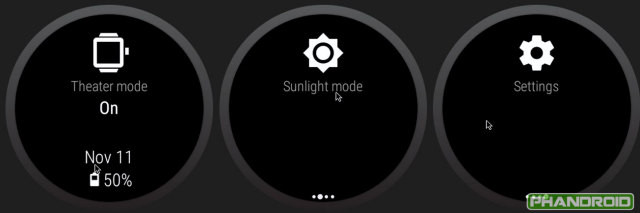
Theater mode and Sunlight mode will be new to the 5.0 Lollipop release for Android Wear. The former makes the wearable’s screen stay off until you double tap it or press the hardware button – even if you get notifications. It’s obviously meant for use in cinemas, and other such spaces where your watch lighting up all of a sudden would annoy the people around you. Sunlight mode, we assume, will instantly crank your watch’s brightness all the way up, so it becomes visible in broad daylight conditions. Until all smartwatches get ambient light sensors, this will prove to be a very useful feature undoubtedly.


The new version of Android Wear will also bring with it some improvements for the visually impaired, including large text, color inversion, and magnification gestures. Lollipop for Android Wear may become available sometime in early December.
Google has updated two more apps for Android. This time we’re talking about the search app which is simply called Google, as well as Google Keyboard.


Both apps are infused with Material Design, sporting fresher, more colorful looks, and smooth animations.
The search app now lets you say “OK, Google” to ask a question even if your screen is off and your phone or tablet is off the charger, though this only works for the Nexus 6, Nexus 9, and Samsung Galaxy Note 4
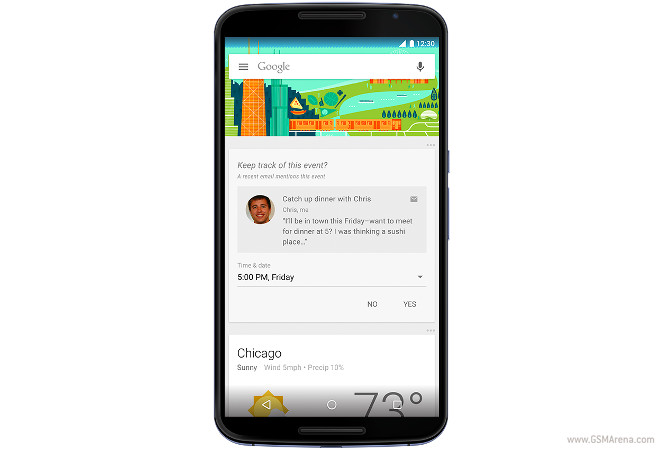
. Google will also go through your Gmail inbox, and if it finds stuff you’ve forgotten to follow up on, will prompt you to add plans to your calendar. This will show up as a new card in Google Now. Other Now cards help you keep track of your trips and to-do lists, and even tell you where you parked your car.
You’ll be able to use the Google search app to search in other apps. When you speak your query, you can simply mention which app you want it to search, and it will. And you can now ask Google Now to flip a coin if you can’t make up your mind about stuff.


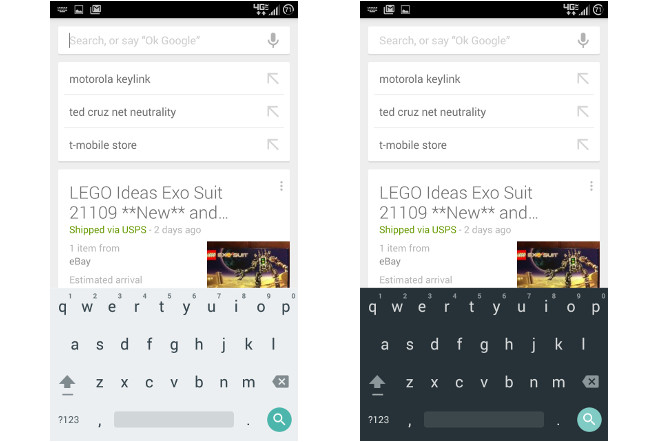
The Google Keyboard app’s update is all about the looks – specifically, Material Design. It comes with two new themes, one light and one dark, which sport that fresh new look (as you can see above). To enable either one, after getting hold of the latest version of the keyboard app (and keep in mind that Google loves staged rollouts for such updates, so it might be a while until you’ll have it), go to Keyboard Settings and pick either Material Light or Material Dark.

YouTube’s much anticipated subscription service has been officially announced today. It’s called YouTube Music Key, and it will be in beta for an unspecified amount of time.


It brings you an ad-free YouTube experience, along with support for background playback on mobile, and offline viewing too.
All of these perks will cost you $7.99 (for a limited time, the normal price being $9.99) per month. But the nice thing is that if you pay for Music Key, you’ll also get a Google Play Music subscription, which gives you access to more than 30 million songs and expert-curated playlists. That in itself costs $9.99 per month, so you’re essentially getting two services for the price of one here.

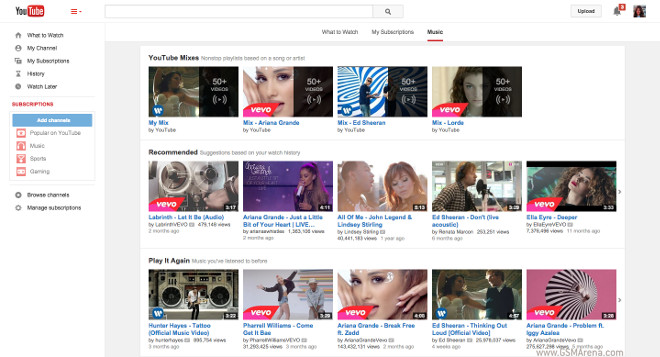
Music videos will soon show up in the Play Music app, and the YouTube apps and the website will get a new Music tab, housing your favorite music videos, recommended playlists, as well as playlists of trending music across YouTube. Also new to YouTube will be the ability to see an artist’s discography, and play a full ‘album’ of official music videos.
YouTube Music Key is currently an invite-only thing, but if you receive an invite you do get a long six-month trial period for the service. YouTube’s “biggest music fans” will apparently get access first, though it’s unclear how the company chooses who those people are.
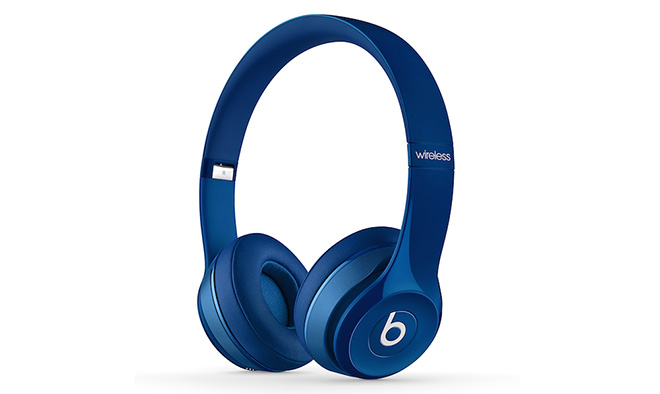
Apple and Beats Electronics took the wraps off the Solo2 Wireless headphones. As its name suggests, the headset is a version of the company’s popular on-ear model without the wires.


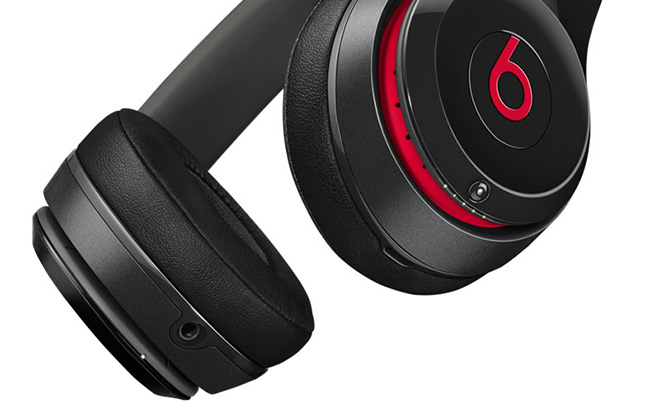
The Beats Solo2 Wireless headset feature the same design as its wired sibling. The newcomer’s Bluetooth connectivity gives it 30 feet of wireless range. Users can control calls and music playback via the “b” button on the side of the headset. Volume buttons are placed on its side.


Battery life is said to be good for up to 12 hours of continuous playback. A bundled cable ensures that users can continue using the headphones even when there’s no juice left.
Beats Solo2 Wireless will be available later this month in plethora of colors, priced at the eye-watering $299.99. That’s $100 premium than the already pricey wired model.

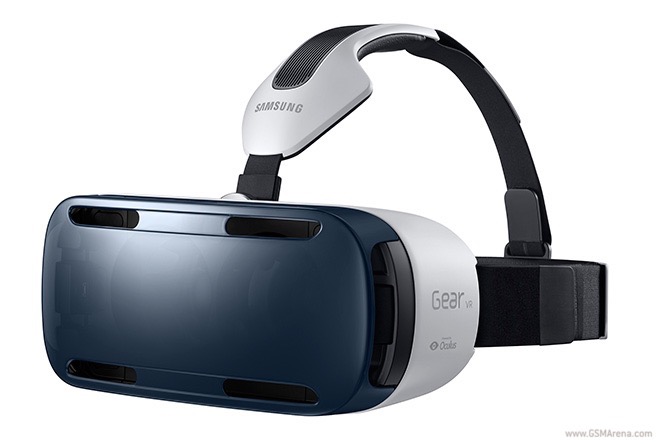
Samsung Gear VR will be available in the United States in the beginning of next month. A special Innovator Edition of the virtual reality gadget will be priced at $199 – in line with past reports. Another $50 will get you a bundled Bluetooth gamepad.


Samsung Gear VR Innovator Edition is geared towards developers and enthusiasts. It is not intended for regular consumers.
Oculus will launch a Mobile SDK for the Samsung Gear VR. Samsung and Oculus are working with a number of partners to bring quality content to the platform.
When paired with Samsung Galaxy Note 4, the VR headset will prompt the phablet to download a several proprietary apps. They include a home screen, a content storefront, and a 360-degree viewing software.
Samsung has announced a new technology called Flow. Well, new would be a bit misleading since it is similar to Continuity that Apple launched with iOS 8 and OS X Yosemite.


Flow has three basic features. The Transfer feature lets you push content between your Samsung devices. You can send a document or a web page from your phone to your tablet, start navigating on your phone and then push it to your Gear S, start watching a movie on a tablet and then push it to your Samsung television, etc. You can also start a video call on one device and then continue it on another.
The other feature is Defer. Defer lets you save tasks on one device so you can access them later on another. You can save a link or a document on your phone and then when you get back to your PC you can continue from where you left off.
The last feature is Notify. Notify syncs notifications between your Samsung devices, so if you get a call or a message on your phone, you will see a notification on all your connected Samsung devices, including your watch, tablet, computer, and even you television.
It’s not clear yet what operating systems will be supported for syncing with your computer, whether it will work with Windows or Chrome OS (or OS X, maybe?) and also how it will work with Samsung televisions.
It’s still seemingly a work in progress but you can expect to find it on Samsung devices in the near future.

Wednesday, October 22, 2014

Nokia’s HERE Maps launched on Samsung’s Galaxy smartphones recently to offer “true” offline navigationand an alternative to Google’s preloaded Maps.


But the app was in testing only on Samsung’s smartphones even despite the leaked apk file that allowed us all to sideload the HERE navigation on non-Galaxy smartphones. Now that’s about to change – Nokia is releasing the apk for all Android smartphones so you can try HERE maps for yourself.
You’ll need to download the apk file to your smartphone and sideload it (using a file manager of some sort) but you’ll need to go into the Security settings of your device and enable the Install from Unknown Sources option. Nokia has the entire step by step tutorial over at the source link.
The app is still in beta so a few bugs are to be expected but it should be safe to try out.

Google has announced a big update for its Play Music service. First off, the Android and iOS apps have received a new, Material Design-infused coat of paint. Second, the service now brings you contextual music stations.


These have apparently been “hand crafted” by a team of music experts, including DJs, musicians, music critics, and ethnomusicologists, to give you exactly the songs you need for a particular moment.
When you open the app, you’ll be prompted to play music for a time of day, mood, or activity. You can choose an activity, such as a workout, a commute, or so on, to get shown several music stations you can then instantly start listening to. These music stations can be downloaded to listen to when you’re offline too. You can also see what song is next, and even reorder the contextual playlist, add songs to it, or remove songs from it. And you get to start a new station for any song in the mix.
Play Music’s Listen Now page has been redone too. Your recently played music, new songs you may like, and radio stations based on what you usually listen to are presented in a card-based interface, complete with Material Design.
The contextual music stations are available today for Play Music subscribers in the US and Canada, through the Web, as well as the Android and iOS apps. The new Listen Now page is showing in all of the 45 countries where Play Music is available, and it too is out for the Web, Android, and iOS.

Back in September, Google told us to expect an update to Android Wear that would bring support for offline music playback and GPS sensors. And now it looks like the first Android Wear device to get the new software is LG’s G Watch.


Some owners of this particular smartwatch have started receiving update notifications. After applying the new bits, they’re on software version 4.4W.2 and build KNX01Q. And sure enough, a new ‘Play Music’ option shows up in the watch’s menu. Furthermore, the G Watch is now capable of pairing itself with Bluetooth audio accessories.
That said, it’s still unclear how exactly you may get music onto the watch, to enable true offline playback as advertised. It’s also a mystery whether playback is only initiated from the phone, or if it will work (as you might expect) even if the watch isn’t connected to a handset. All of these things will undoubtedly get cleared up once more people start receiving the update. It’s a staged rollout, that’s for sure, so if you own a G Watch, you could still need to wait a few days for it.
Because the G Watch doesn’t have a built-in GPS, that functionality isn’t applicable here. In fact, the only Android Wear device that was announced so far and has a GPS sensor is Sony’s SmartWatch 3, which isn’t on sale yet.

Olloclip is a name you may have heard if you ever looked for attachable lenses for your iPhone. The company has created a new edition of its 4-in-1 photo lens for the iPhone 6 and 6 Plus. The design has been updated to allow the lens clip to be carried as a pendant, making it easier to bring with you everywhere.


The 4-in-1 photo lens includes a fish eye lens and a wide-angle lens. You can unscrew them to get a 15x macro and 10x macro lens respectively.
The lens has been designed so that it covers the front and back cameras simultaneously for all the fish-eye selfies you want. There’s an accompanying app you can download from the Apple App Store, which will help with fish-eye and macro shots.

The pendant will be available in three colors, while the 4-in-1 photo lens itself will be available in four – Gold or Silver lens on a White clip or Silver, Red or Space gray lens on a Black clip. The lens is available for pre-order right now for $80, it will ship in late November.


Google has today announced it’s started supporting a new type of two-factor authentication for its websites, as long as you use its Chrome desktop browser. The existing 2-step verification system is based on you entering your password followed by a six-digit code that you either receive via SMS or get from a special mobile app.


The new system replaces the code-entering with inserting a physical USB device into your computer, then tapping its sole button when prompted to do so.
Obviously then, this is a simpler way to perform two-factor authentication, from the user experience perspective. It relies on a specific physical object (the required USB device), which you can carry with you on your keychain, for example. On the other hand, that device seems easier to lose than a phone, so understandably the new system will be opt-in. And you’ll still be able to use the old code-based one if you so choose.

The Security Key USB device only works after having verified that the login site truly is operated by Google, thus preventing against phishing attacks. All of this works because Security Key and Chrome (since version 38) incorporate the Universal 2nd Factor (U2F) protocol developed by the FIDO Alliance. This means other websites with login systems will also be able to use the same system if they want to.
The new Security Key will be free to use for Google accounts, but you have to purchase a special USB authenticator device – your existing USB sticks won’t work for this purpose. Google helpfully recommendsa couple of Amazon-listed products, the cheapest currently going for $5.99.


The HTC Nexus 9 tablet itself went up for pre-order last week. And now you can pre-order both the Keyboard Folio for Nexus 9, as well as the Magic Cover for the tablet from Amazon.


The former of those will cost you $129.99, while the latter is priced at $39.99. The Magic Cover comes in four different hues. You can choose from black, ‘coral amethyst’, ‘lime stone’, and ‘mint indigo’.
The Keyboard Folio is a case and a keyboard at the same time. When closed, it protects your Nexus 9. When opened, it reveals a mechanical keyboard for the tablet. You can fold it in two different angles, and it attaches to the back of the Nexus 9 magnetically. The Magic Cover is magnetic too, and it too can fold into two positions. It also supports automatic screen wakeup and sleep when you open or close it.
The accessories are due to become available on November 3, which is actually the release date for the Nexus 9 tablet as well.

Motorola’s Moto 360 smartwatch received a major firmware update. The new Android Wear build brings a host of new features and improvements to the wearable timepiece.


The two most notable new features that the update brings are Smart Battery Saving and more frequent time checks. The former will automatically turn off ambient mode on the device when its battery reaches 15%, while the latter will ensure that the Moto 360 always shows accurate time.
User interface tweaks have also been included in the firmware update. Mood lighting has been added as well – it will adjust the screen brightness of the Moto 360 to match the environment.
On a side note, the Qi wireless charger of the smartwatch is now officially up for grabs in the Google Play store. The accessory is priced at $39.99.
The Nexus 6 is a big phone. You can tell that from the display size or from reading the dimensions. But nothing drives the point home than watching it being compared with phones that we are already familiar with.


TechCrunch did a hands-on with the Nexus 6 and there are two images from the article that are worth focusing on. The first is the image above, where the Nexus 6 sits next to the iPhone 6 PlusNow the iPhone 6 Plus is a big phone, but the Nexus 6 isn’t that much bigger despite packing half an inch of extra screen. But the more hilarious image is the one below.


Bear in mind the Nexus 5 has a 4.95-inch display and isn’t exactly a small phone by any means. But look how it is absolutely dwarfed next to the new Nexus 6. I mean, this is like the time you went to a supermarket and spotted a family pack version of something you are used to seeing in the normal size.
Yeah, good luck using that with one hand.

Sunday, September 28, 2014

Apple iOS 8 was released to all compatible devices on September 17, but it wasn’t a smooth launch at all. The iOS 8 was plagued by lots of bugs, Apple even removed all Health-related apps due to a bug in its HealthKit. This is where the iOS 8.0.1 update came to help, but while it may fixed the Health app issues, it broke the cell reception and Touch ID on quite a few phones.


So, the iOS 8.0.1 update was quickly taken down and iOS 8.0.2 appeared two days later to fix the Heath app and what the 8.0.1 update broke. Many users disappointed by the iOS 8 behavior decided to revert back to iOS 7.1.2, but this option now no longer available.
Apple has stopped signing the iOS 7 firmware since Friday afternoon so no one will be able to revert back to iOS 7 if they upgraded to iOS 8. This probably means Apple already considers the iOS 8 bug-free or at least smooth enough to be ready for mass adoption.
The adoption rate is indeed great, as every other previous iOS rollout, and Apple has done nothing unexpected. It always wants the majority of its users to run on the latest version because all those new services, security patches, etc. But it could have waited a month or two before it took this aggressive approach, just to be safe.

Saturday, September 27, 2014

With iOS 8.0.2 now seeding, apps using the Apple HealthKit suite have started appearing in the App Store.


The first of the apps to appear in the App Store is FitPort, which gives you all available health information to you while syncing with HealthKit. The new health-related framework also allows you to be very picky on what information you share with third-party apps.
The issues that were reported a bit over a week ago, were originally supposed to be fixed with iOS 8.0.1. Since the update’s life was short due to bugs breaking the cellular and Touch ID functionality, it was pulled by Apple.
Expect more health-related apps to appear on the App Store in the coming days and weeks.
After SamsungLGHTC, and even KitKat, Asus has joined the #bendgate fun party by mocking the iPhone 6 Plus too. The Taiwanese company is also promoting two of its products while it’s at it. First up, theZenfone 6, as you can see.


But the Transformer Book Flip gets compared to Apple’s bendy phablet too, in the next image.
Mocking the iPhone 6 Plus for how prone it is to bending has become all the rage in the mobile world over the past few days. At this rate, in a few more days there won’t be a smartphone maker under the sun that hasn’t hit Apple’s phablet where it hurts – or rather, where it bends.

Asus says “the best way to bend is to flip” in one of its Facebook posts accompanying these pictures. Apple may have recently boasted about how well it tests its devices, but this meme shows no signs of dying down just yet, so the company will just have to put up with such mockery.
Thanks for sending this in, Arjunsinh Jadeja!

We have all had our fun with the BendGate jokes. But sometimes it’s important to set the jokes aside and ask why is it that it’s happening and how come some of the other devices don’t share the same problem.


Most people have blamed the aluminum shell on the iPhone 6 for being the culprit here, because aluminum is a soft metal. However, one redditor has explained that it doesn’t really have anything to do with the shell but how the internal geometry of the phone is.
What follows below is his comment on reddit:
This isn’t right. iPhone’s bending problem has nothing to do with aluminum. It has everything to do with geometry.
((Edit: Material choice matters, always. But material has to work together with the geometry it’s been shaped into. The choice of aluminum here isn’t the limiting factor. The geometric design of the aluminum chassis is.))

 Nobody uses pure aluminum for general purpose manufacturing. They use aluminum alloys instead. And the alloys themselves are incredibly diverse.
You can get extremely rigid alloys that will be incredibly difficult to bend even in thin structures prone to bending (such as 7075), but the disadvantage of that is difficulty of machining (and often welding too). This type is dominantly used in transportation industry (automotive, marine, aircraft, etc). Manufacturers take the additional manufacturing costs in order to reap the great strength-to-density ratio.
And then there are buttery soft alloys that are extremely easy to machine (3031 for instance), even manually, but they’re also way too deformable to be useful for any load bearing purposes. I don’t have too much experience with these, but they’re cheap, and generally a good choice for decorative uses.
Apple uses anodized 6000 series aluminum (most likely 6061, possibly a tempered variant like -T4 edit: apparently it’s 6003, which is similar to 6061 in properties). This is a good compromise between the extremes, and is the most ubiquitous aluminum alloy out there. It’s got good mechanical properties, easy to machine, easy to weld. Their choice of material was correct in this case.
The problem with the iPhone 6 chassis comes from something we call “stress concentration” in engineering and this phenomenon is related to the geometry of an object. More specifically, it has to do with the cross section profile that is being bent.
If you watch the bending test video, you’ll notice that iPhone 6 bent exactly at the root of the volume buttons. And if you look even more closely, you’ll notice that the bending is actually on just one side — the side of the volume buttons. The opposite side is actually mostly unscathed.
This is because the cross section area of the bending profile decreases dramatically right at that point. They have cut out a hole to accommodate the volume buttons, and when under loading, the internal stresses of the structure are being concentrated at the base of this cutout. So when the structure fails, it fails at that point. The lower cross section area decreases the resistance to bending, and makes it possible to bend the chassis at a lower applied force than what it would take otherwise, had the volume buttons not been there (but of course they have to be there).
The result here wouldn’t have changed if Apple had used plastic in place of aluminum. In fact, it probably would have been worse. Typically phone manufacturers use brittle plastic in their devices (ductile plastic is the kind that feels really cheap and terrible), so the chassis would have broken entirely at the same point. They could have avoided the issue, maybe, if they opted for steel or a tougher aluminum alloy but then you run into other problems and have to retool essentially your entire product line.
The reason why Galaxy Note 3 passes the bending test doesn’t have anything to do with the material it’s made out of. It has everything to do with the internal geometry of the chassis. The internal magnesium alloy chassis (which isn’t any better than aluminum as a material) has an I-beam cross section that is great against bending, and it’s further sandwiched between two shells, which are in this case plastic. It’s reinforced very thoroughly, to the point where human-applied forces cannot bend the device beyond its “elastic range” (this is the deformation range within which the device can recover to its original state when loads are removed).
Apple could have designed the aluminum chassis in a way that would accomplish the exact same thing, and if they had, people wouldn’t be mistakenly criticizing the aluminum here. They would just be talking about how nice the material feels to the touch (because it does, and yes, it is “premium” much more so than plastic). Unfortunately, they fucked it up. Again, it’s all in the geometry.
So to be clear, Apple is at fault here, and the company’s obsession with making its products thinner has once again resulted in design compromises being made elsewhere. It’s not the aluminum to blame, however, (the HTC One M8 doesn’t bend) but rather the internal geometry.
Should this be a cause for concern, though? Considering how few actual people have reported the problem, I would say no. Not unless you put your phone in your pocket and do yoga. It takes a lot of force for the phone to bend like that and merely having it in your pocket won’t bend it like that. But it’s something to keep in mind and consider as a trade-off for having such a thin metal phone.